
Router Flow Export
CoreDetection analyzes traffic from flow telemetry exported by your routers. The bundled Flow Engine listens on standard UDP ports and stores enriched records in ClickHouse for detection and the Traffic Monitor.
Collector ports
| Protocol | UDP port | Typical use |
|---|---|---|
| NetFlow v5/v9 | 2055 | Cisco, Juniper, MikroTik, many vendors |
| IPFIX | 4739 | Modern IPFIX exporters |
| sFlow | 6343 | sFlow agents on switches/routers |
:8080) is bound to localhost only — use the portal Traffic Monitor for analytics.Export destination
Point all flow exporters at the CoreDetection server IP:
- Collector IP: your appliance server address
- Ports: match your export protocol (see table above)
- Exporter identity: set a recognizable exporter name or source IP — used by the BGP exporter map for selective mitigation
Verify flows are arriving
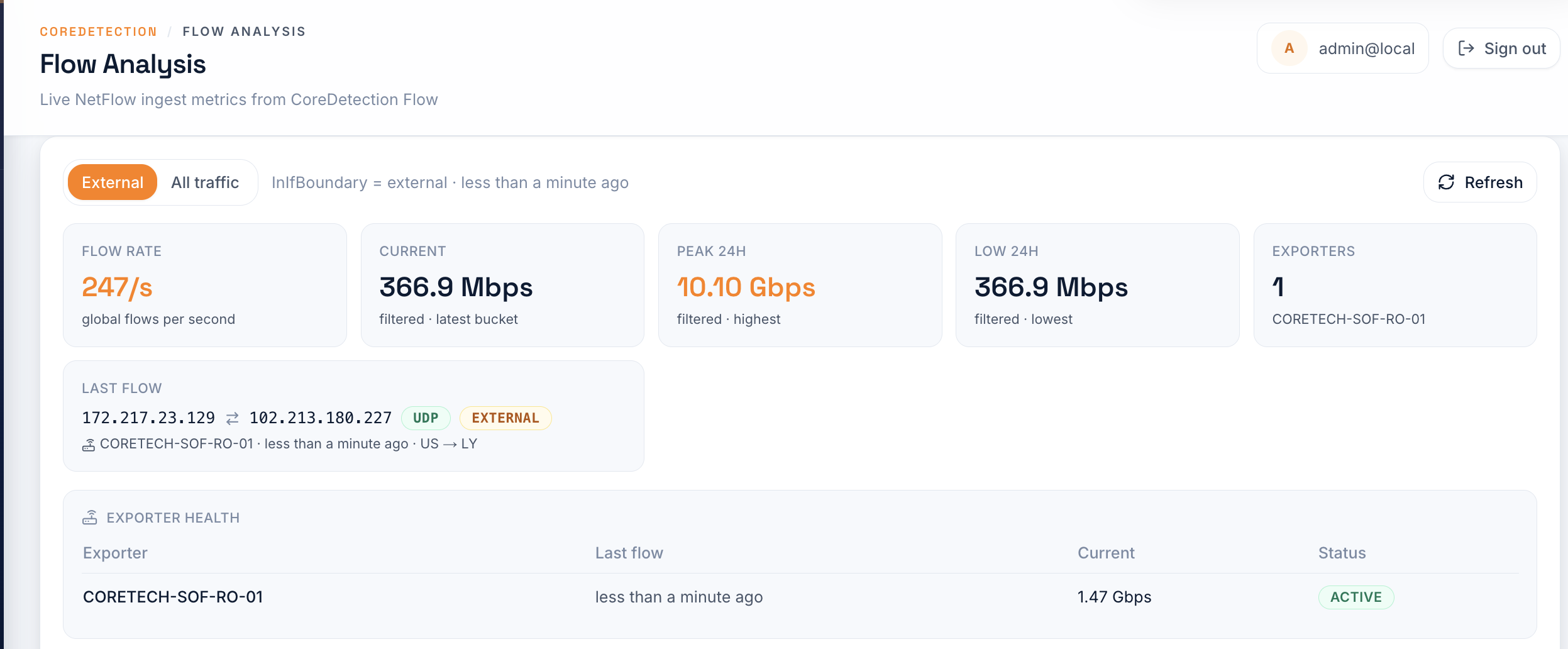
- Open the portal → Dashboard — check Flow Analysis widget for non-zero flow rate
- Open Traffic Monitor — confirm charts populate with external traffic
- Check exporter health in Flow Analysis — status should show
ACTIVE
Detection filters
By default CoreDetection evaluates traffic where dst_net_role = customers and in_if_boundary = external (see Configuration → Traffic Filters). Your flow exporter must tag these fields correctly in the enriched pipeline, or adjust filters in config.ini to match your network model.
Protected destination prefixes are defined in network.yaml — see Protected Networks.
Vendor configuration examples
Replace COLLECTOR_IP with your CoreDetection appliance address and EXPORTER_NAME with a unique label per edge router (used by the BGP exporter map). Sample rate is a starting point — tune for your traffic volume and CPU budget.
Cisco IOS-XR (ASR 9000, NCS, XR routers)
NetFlow v9 export on UDP 2055. Hostname becomes the exporter identity in flow records.
hostname EXPORTER_NAME
!
flow exporter-map COREDETECTION-EXP
 destination COLLECTOR_IP
 source Loopback0
 transport udp 2055
 option interface-table timeout 600
 option vrf-table timeout 600
!
flow monitor-map COREDETECTION-MON
 record ipv4
 exporter COREDETECTION-EXP
 cache entries 1000000
 cache timeout active 60
 cache timeout inactive 15
!
sampler-map COREDETECTION-SAMPLE
 random 1 out-of 10000
!
interface GigabitEthernet0/0/0/0
 description Internet-facing uplink
 flow ipv4 monitor COREDETECTION-MON sampler COREDETECTION-SAMPLE ingress
 flow ipv4 monitor COREDETECTION-MON sampler COREDETECTION-SAMPLE egress
For IPFIX on port 4739, use record ipv4 with an IPFIX-compatible record map (platform-dependent) and set transport udp 4739 on the exporter.
Nokia SR OS (7750 SR, 7250 IXR, 7450 ESS)
IPFIX export on UDP 4739. System name is the exporter identity.
configure system
    name "EXPORTER_NAME"
exit

configure router "Base" flow ipfix
    collector COLLECTOR_IP port 4739
    version 10
    template-refresh 600
    max-flows 1000000
exit

configure router "Base" interface "1/1/c1/1:100"
    ingress
        sap-ingress 100 create
            capture ip 10000
            collect-stats
        exit
    exit
    egress
        collect-stats
    exit
exit
Apply capture ip sampling on each customer-facing SAP. For multi-service edges, repeat on every ingress SAP that carries protected traffic.
Huawei VRP / NetEngine
NetStream (NetFlow v9) on UDP 2055. sysname is the exporter identity.
sysname EXPORTER_NAME

ip netstream export host COLLECTOR_IP 2055
ip netstream export source LoopBack0
ip netstream export version 9
ip netstream export template timeout-rate 600

ip netstream sampler fix-packets 10000 inbound
ip netstream sampler fix-packets 10000 outbound

interface GigabitEthernet0/1/0
 description Internet uplink
 ip netstream inbound
 ip netstream outbound
On NetEngine platforms that support flexible flow monitoring, you can alternatively use flow exporter / flow monitor objects (IOS-XR-style syntax) with the same collector IP and UDP port.
Arista EOS
Flow tracking with IPFIX-style export on UDP 4739 (or 2055 for NetFlow v9).
hostname EXPORTER_NAME
!
flow tracking
   tracker COREDETECTION-TRK
      record ipv4
      exporter COREDETECTION-EXP
      active timeout 60
      inactive timeout 15
   !
   exporter COREDETECTION-EXP
      local interface Loopback0
      description EXPORTER_NAME
      destination COLLECTOR_IP
      transport udp 4739
   !
   sample 10000
!
interface Ethernet1
   description Internet-facing uplink
   flow tracker COREDETECTION-TRK
Enable flow tracking on every external interface. The exporter description appears in collector metadata — match it in the exporter map if hostname alone is not enough.
Juniper MX / PTX / ACX (Junos)
IPFIX export on UDP 4739. Device hostname is the exporter identity.
set system host-name EXPORTER_NAME

set services flow-monitoring version-ipfix template IPV4-TEMPLATE flow-active-timeout 60
set services flow-monitoring version-ipfix template IPV4-TEMPLATE template-refresh-rate 600
set services flow-monitoring version-ipfix template IPV4-TEMPLATE flow-inactive-timeout 15
set services flow-monitoring version-ipfix export-format ipfix template IPV4-TEMPLATE

set forwarding-options sampling instance COREDETECTION input rate 10000
set forwarding-options sampling instance COREDETECTION family inet output flow-server COLLECTOR_IP port 4739

set interfaces ge-0/0/1 unit 0 family inet sampling input
set interfaces ge-0/0/1 unit 0 family inet sampling output
MikroTik RouterOS
NetFlow v9 on UDP 2055. System identity is the exporter name.
/system identity set name=EXPORTER_NAME

/ip traffic-flow set enabled=yes interfaces=all cache-entries=4M

/ip traffic-flow target add dst-address=COLLECTOR_IP port=2055 version=9

/ip traffic-flow printNext steps
- Protected Networks — define monitored prefixes
- Traffic Filters — tune
dst_net_roleandin_if_boundary - Portal → Traffic Monitor